Genshin Impact Cosplay: Choose the Outfit Version Before You Shop
Use an Ayaka Springbloom Missive example to separate character references, costume versions and purchase options.
Searching for a character’s name is only the first step in buying a cosplay costume. You also need to decide which outfit you want to recreate. A favourite game screenshot, an illustration and a shop listing can show different looks for the same character. Choose your reference before buying the clothing, then match the supporting pieces to that version.
Name the outfit as well as the character
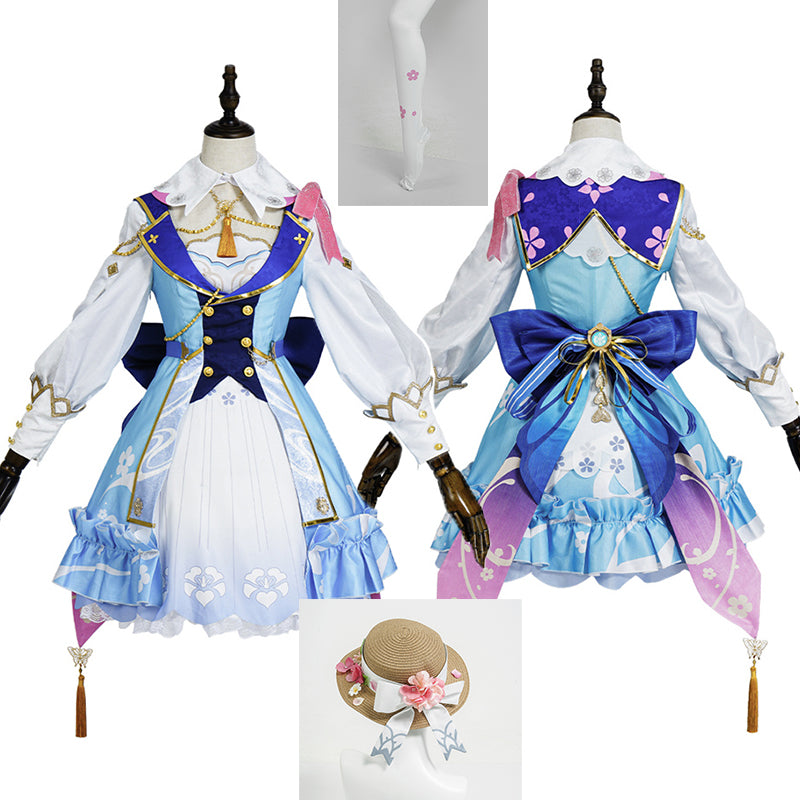
For an Ayaka cosplay, “Kamisato Ayaka” alone leaves part of the decision open. HoYoWiki’s Kamisato Ayaka entry identifies Springbloom Missive as an outfit. HEROCOS has a Springbloom Missive costume listing, so include that outfit name when saving your reference or asking about the item.
Keep a note with the character, outfit name and the source of the reference. If your starting point is fan art or your own redesign, record the differences you want to keep. That makes it easier to distinguish a deliberate adaptation from an accidental mix of versions.
Compare the clothing from the outside in
Open your chosen reference beside the product photographs and work through three passes. Start with the whole outfit, then the placement of details, and finally the accessories. This keeps a striking wig or prop from distracting you from the costume you actually want.
- Outline: compare the shape of the sleeves, outer layer and lower half of the outfit. Check front and back views where available.
- Placement: note where bows, closures, borders and other visible details sit. If a detail matters to you but is hidden in every product photo, ask for clarification.
- Finishing pieces: compare headwear, legwear and footwear against the same reference. Avoid switching to an image of another version midway through the check.
A similar colour name is not enough to establish a match. Lighting and screens affect how photographs look, so focus first on design and placement. Where an exact detail is essential, ask about that detail rather than requesting a general promise of “perfect accuracy.”
Keep outfit versions separate from purchase options
An outfit name describes the look. A shop option describes what you are selecting from that listing. On the current Ayaka page, for example, “Costume+hat+leggings” and “Only Wigs” appear among the style options. The latter is an accessory option, not a clothing purchase. Read the selected option and its current price together before adding it to your bag.
Once you have identified the outfit, use our guide to checking costume set contents for the separate task of confirming the pieces you will receive. Do not use a styled photograph as a packing list.
Make one reference note for the whole look
Put your clothing choice at the top of a short checklist. Underneath, list the supporting pieces you already own, the ones included in your chosen option and the ones you still need to confirm. For a group photo, share the outfit name with the other participants so that everyone is planning from the same brief.
Leave sizing as a separate check. Ayaka’s current product note says its sizing is not standard US sizing. Review the reference for your selected design, confirm whether the measurements refer to the body or the finished garment, and ask about any ambiguity before choosing. Matching an outfit version does not establish that a particular size will fit.
Ask a question that can be answered precisely
A useful message includes the product link, selected style and the one detail you want checked: “I am planning Ayaka’s Springbloom Missive look. For this selected option, can you confirm the headwear and provide a clearer back view?” Add any fit questions separately so neither gets lost.
Browse the Genshin Impact costume collection with your reference note in hand, or contact HEROCOS about a specific listing. Choose the clothing first; let wigs, shoes and other details support the version you have chosen.
EXPLORE THE COSTUMES
Mentioned in this guide
View the current options, size information and selected price on each product page.