Photograph a Detailed Cosplay Costume: A Simple Shot Plan
Plan an outfit view, an upper-body frame and one detail shot, with backgrounds and accessories that keep the clothing visible.
A detailed cosplay costume can look quite different in a full-length photograph and a close portrait. Before planning a shoot, choose which parts of the clothing you want each picture to show. A short shot list gives you something more useful than trying to fit every costume detail into every frame.
Give each photograph one job
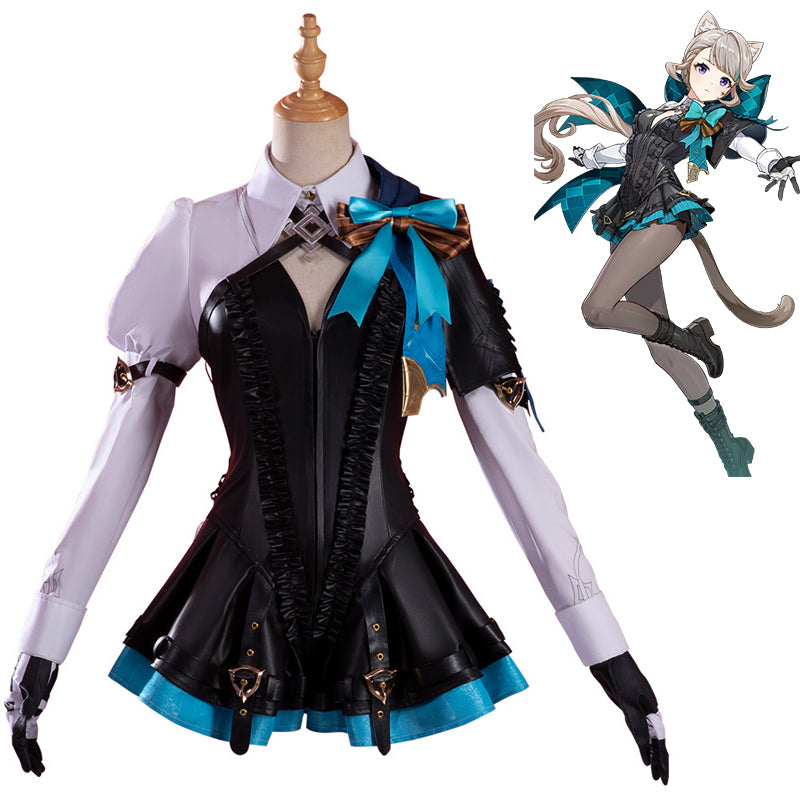
Start with three pictures: an overall outfit view, a view of the upper-body design and one detail you particularly like. For example, the product photographs for the HEROCOS Lynette costume show a turquoise chest bow against darker clothing. That contrast offers a clear subject for an upper-body picture, while a wider photograph can show the outfit’s outline. This is a visual planning example, not a claim that we have photographed or wear-tested this costume on a customer.
- Overall view: leave room around the head, sleeves and footwear so the clothing’s shape remains visible.
- Upper-body view: choose a framing that includes the collar and chest detail instead of accidentally cutting through them.
- Detail view: select one feature, such as a bow or trim, with enough surrounding clothing to show where it belongs.
If a cape, long hair or a hand covers the detail you wanted, change the pose rather than adding more accessories. Take one simple standing picture before trying a more elaborate arrangement. The plain version gives you a useful comparison.
Choose a background that lets the clothing read
Look at a test picture on your phone before committing to a location. A busy pattern behind the body can compete with trim, while a background close to the garment’s colour can make its edges harder to distinguish. Try a simpler background or a different camera position and compare the two images.
Check the brightest and darkest areas of the clothing. If important details disappear, try a different position relative to the light. You do not need to guess a fabric’s performance from its product description: judge the photograph of the actual outfit in front of you. Avoid promising yourself an exact colour match between a shop image, a game image and your own camera.
Keep the first accessories modest. A large prop can hide the waist or sleeves, and a long wig can cover the neckline. Make the clothing picture first, then add a supporting item and decide whether it improves that particular frame. Items in a styling plan are not automatically included in a costume purchase.
Share a short plan with your photographer
Write three plain notes: the view, the detail to preserve and anything that must stay comfortable. For example: “Upper body; keep the chest bow visible; no raised-arm pose.” Agree on these before the shoot and stop a pose if it pulls the garment or feels awkward. Our costume movement checklist can help you prepare for wearing the outfit; the photo plan decides what the camera should see.
When browsing Game Costumes, use the gallery to identify the clothing details you would like to photograph, then confirm your selected item’s contents and fit separately. Ask HEROCOS about unclear garment details before ordering. A useful shot list should fit the costume you actually have, rather than depend on an unconfirmed accessory or an uncomfortable pose.
EXPLORE THE COSTUMES
Mentioned in this guide
View the current options, size information and selected price on each product page.